Device frames at real proportions
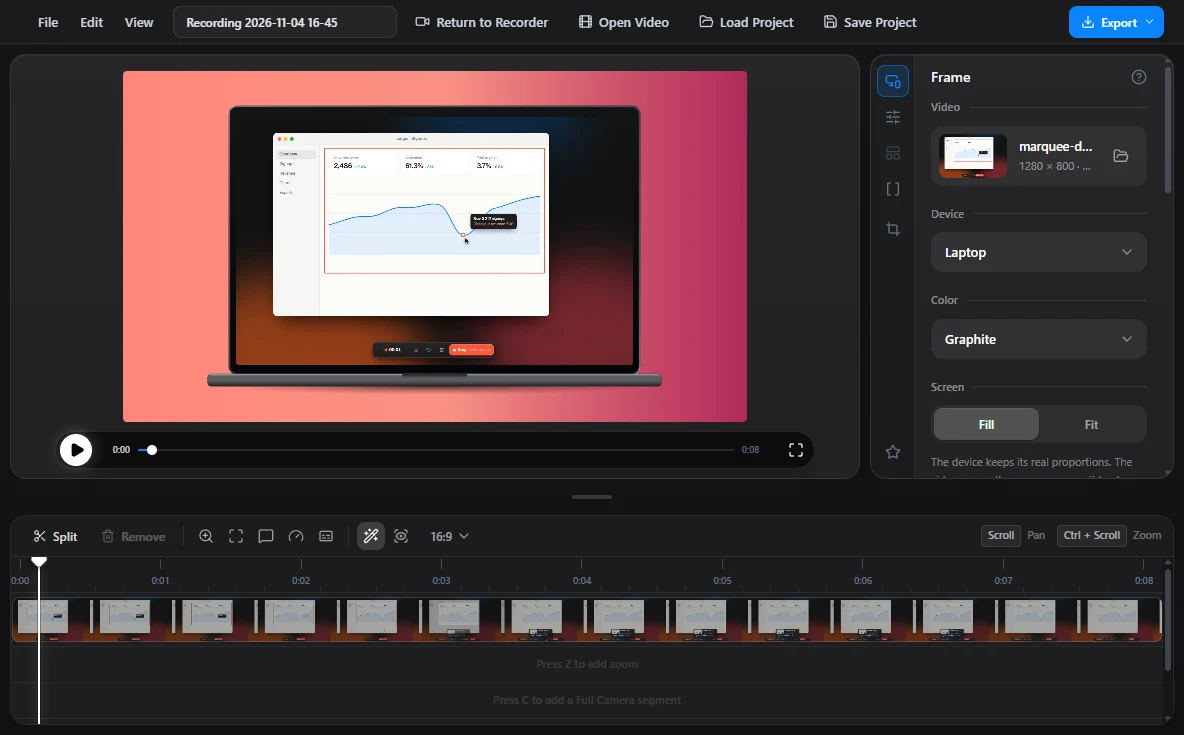
Phone, tablet, laptop or browser window, in graphite, silver, black or white. A device never stretches to fit the video: you scale it, turn it, and choose fill or fit.
Now showing · Free and open source
Marquee records any part of your screen and saves the MP4 the moment you stop. When a clip needs polish, Studio adds zooms, device frames and captions.
Windows, macOS and LinuxMIT licenseNo account
Why Marquee
Showing beats explaining. A ten second clip of the bug, the chart or the new button says more than three paragraphs in a chat.
Marquee keeps that clip one keystroke away. It waits in the tray, starts on a single shortcut and puts every recording in a folder you choose, already named and ready to send.
How it works
Act I
One shortcut starts and stops a recording from anywhere. The area picker opens with your last area already drawn, so a repeat take is shortcut, then Enter.
Act II
Drag out any area, snap it to 16:9, 4:3, 1:1 or 9:16, or pick an exact 720p or 1080p frame. The size is shown in real pixels.
Act III
A second or two later the MP4 is in your folder. Copy the file straight into a chat, or upload it to Yandex Disk and copy the link.
Studio
Turn the camera on or make the cursor editable, and the recording keeps its tracks for Studio. Frame it, cut it and export it from one window.
Phone, tablet, laptop or browser window, in graphite, silver, black or white. A device never stretches to fit the video: you scale it, turn it, and choose fill or fit.
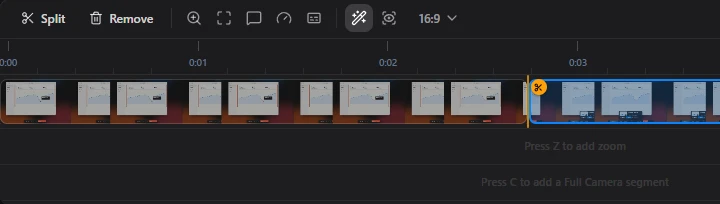
Split with T and remove with Delete, as in any editor. The cut stays marked on the track, and one click puts the piece back.
Whisper turns a 77 second meeting into text in about 14 seconds on a midrange GPU. A transcript and subtitles land next to the video. Nothing is uploaded.
Auto zoom tracks where you work. Depth, duration, easing and position stay yours to tune, down to the pixel.
MP4 at 720p, 1080p or the source size, or a GIF. Save it anywhere, or publish to Yandex Disk and copy the link.
The fine print, in large type
Every clip lands in a folder you own. Nothing leaves your computer unless you ask, and nothing is locked behind a paywall.
Free, for real
Marquee has no paid plan, no watermark and no sign in. It is MIT licensed, so you can use it at work, change it and ship your own build.
Marquee is a fork of OpenScreen, created by Siddharth Vaddem and carried on by its contributors.
FAQ
Yes. There is no paid plan and nothing is locked. The MIT license allows personal and commercial use, changes and redistribution.
Windows, macOS (Apple Silicon and Intel) and Linux, as a .deb, a .pacman package or an AppImage. Every installer is on the releases page.
The installers are not code signed yet. On Windows, choose More info, then Run anyway. On macOS, the install notes have a one line command that clears the quarantine flag.
Marquee is the new name of OpenScreen Creator Edition. The releases on GitHub still carry the old name for now.
No. Every clip is saved to your own folder. A link is made only when you press Copy link, which uploads that one file to your Yandex Disk. Sharing never deletes the clip from your folder.
Yes. Microphone and system audio are toggles on the recorder, and window or screen recordings can include the camera as picture in picture. Area clips always include the cursor and leave the camera out.
Whisper runs on your computer. The speech model downloads once, the first time you transcribe (about 560 MB for the GPU model, 250 MB for the processor one), and works offline after that.
Yes. Studio opens MP4, MOV, WebM, MKV and AVI files, from the title bar, by dropping a file onto the editor, or from the recorder menu.
It is young software, so expect rough edges. If something breaks, an issue on GitHub helps the most.
Free for Windows, macOS and Linux.